Short answer: Peloton WellView (also written Well View, WellView Peloton, Peloton Well View, and the misspelling Peleton Well View) is oil and gas well-file software. It tracks planning, drilling, completions, tests and workovers as a corporate well record. It is not a pumper gauge app. If you need that well file, keep WellView. If you need yesterday’s gauges, run tickets and proof the pumper visited, GreaseBook is the better fit. If he can text, he can use GreaseBook. Average learning curve is 8 minutes.
A supervisor is on the lease with a service crew. They need the well-history file: how many joints of tubing, where the packers are. That is WellView’s job. A different morning, ops just wants yesterday’s gauges without calling three guys. That is not a well-file job. Mixing them is how you buy a schematic tool and still cannot verify the pumper showed up.
Is Peloton WellView or GreaseBook the Better Fit for My Operation?
It depends on the job. If engineering, drilling and compliance need a shared wellbore record, WellView oil and gas software is built for that, and Peloton says it has been in that game since 1991 with 600+ clients (Peloton About Us, July 2026). If the problem is daily production and pumper oversight, GreaseBook does that job as of November 2026: 600+ production companies, geofenced visits, offline entry. Many independents running a handful of wells to over 2,000 keep the well file they have and add GreaseBook for the route.
What Is Peloton WellView?
WellView software is Peloton Computer Enterprises’ well data lifecycle product. WellView Allez is the cloud (Azure) edition. A WellView software tutorial search will land on Peloton’s own training, not a public sandbox. Peloton Go is a summary app for drilling, well and production operations, not a pumper gauge sheet.
This is the same Peloton as ProdView. It is not the bike company.
What Does WellView Do Best, and What Does GreaseBook Do Best?
| What Peloton WellView does best | What GreaseBook does best |
|---|---|
| Corporate well file from planning to abandonment | Daily gauges, tickets and comments on the pumper’s phone |
| Visual schematics from casing, cement and completion records | Proof of visit with geo-fencing |
| Configurable workflows for data loading and QC | Offline entry that syncs later |
| Browser, laptop or tablet for engineers and ops | iPhone and Android, 8-minute pumper learning curve |
| APIs and ETL into Power BI or Spotfire | State reports prepared for any oil and gas producing state |
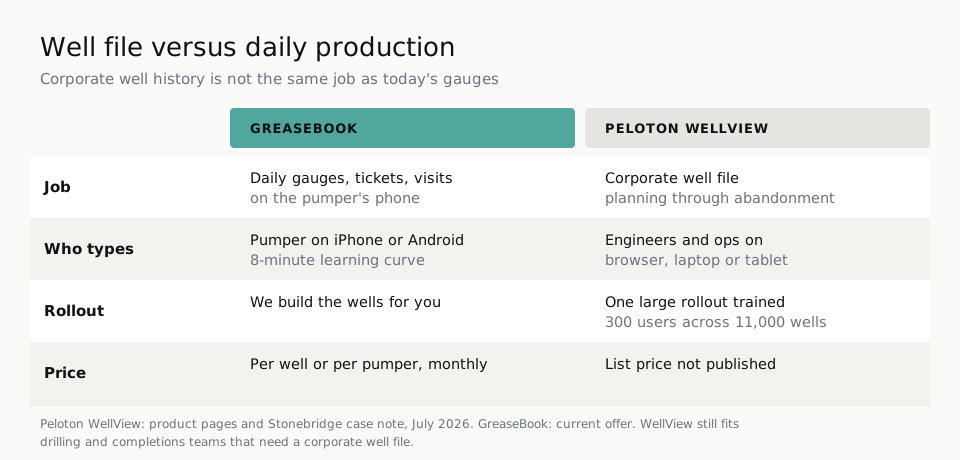
A Stonebridge case note (Nov 15, 2016) describes one large WellView rollout: under four months, training more than 300 users, migrating operational data for 11,000 wells. That is a real project. GreaseBook setup is the other direction: our petroleum engineers build your wells, and most operators are fully rolled out within a week.
On the production side specifically, a pumper phone beats a well-file module. That is a footnote. Keep WellView for the wellbore.
How Does GreaseBook Handle the Field Side?
The pumper keys it in at home on the laptop, not standing at the well, when the tool is a desktop well file. GreaseBook is built for the opposite: entry at the well, on the phone he already carries, with Fat Finger checks as he types.
Well tests, downtime and shut-in state land on the well so allocation is not garbage-in. GreaseBook prepares state production reports for any oil and gas producing state, ready for you to review and submit. If your state’s form isn’t built yet, we build it at no cost. For the wider picture, see oil and gas production data management software.
Our petroleum engineers build it for you. Pumpers learn it in about 8 minutes. 200% money-back guarantee.
See if GreaseBook fitsThe Amateur vs. the Pro
| The Amateur | The Pro |
|---|---|
| Buys WellView Allez because a demo showed a pretty schematic, then asks pumpers to log gauges in a browser | Keeps WellView for drilling and completions, puts GreaseBook on the route |
| Googles a Peloton WellView tutorial and stalls when there is no public sandbox | Asks Peloton for training hours in writing; uses GreaseBook’s half-day pumper sit-down |
| Treats Well View software and ProdView as one login | Names WellView as the well file and ProdView as production data |
What to Avoid
- Forcing pumpers through a well-file UI. Peloton’s own WellView Allez brochure points at desktop, laptop or tablet.
- Ignoring the 2016 Stonebridge shape. 300 users and 11,000 wells is not a phone-app rollout.
- Skipping geo-fence. Wells slip when you cannot prove the visit.
What GreaseBook Facts Should You Know?
As of November 2026, 600+ production companies trust GreaseBook with their data. 10,000+ pumpers use it in the field. GreaseBook has 15 years in the oil patch, has tracked 220 million+ barrels, and serves operators in 22 oil-producing states. The average pumper learning curve is 8 minutes. GreaseBook has a 98% operator trial success rate and a 200% money-back guarantee: run it a full 6 weeks, and if you don’t see results, we pay you double what you paid us. TinyPumper is GreaseBook’s sister product.
What Is GreaseBook Not?
GreaseBook is a production app. It does not replace WellView as a wellbore schematic system. It feeds clean production data to the accounting system you already run, including PakEnergy (formerly WolfePak), OGsys, Bolo, SSI, P2, PHDwin and the rest of the majors you’d expect.
Who This Page Is Not For
This page is not for drilling engineers who need WellView as the corporate well file and are not shopping a pumper app. For production data management, use oil and gas production data management software.
Frequently Asked Questions
What is Peloton WellView?
Peloton WellView is well lifecycle software from Peloton Computer Enterprises. It is a corporate well file for planning, drilling, completions, testing and workovers, with visual schematics that update as records change. Peloton About Us (July 2026) says WellView development began in 1991. WellView Allez is the cloud edition hosted on Microsoft Azure.
What is the best WellView alternative for daily production?
WellView’s alternative for a well file is another well-data platform, not a pumper app. If you searched wellview alternative because you need gauges, tickets and proof of visits, GreaseBook is the better fit for that job. Pumpers learn it in 8 minutes, it works offline, and a 200% money-back guarantee backs a 6-week run.
Is WellView the same as ProdView?
No. WellView is the well file. ProdView is Peloton’s production data product, with ProdView Go in the field. WellView Peloton and ProdView Peloton are sister modules in one platform. If your pain is daily gauges, start with GreaseBook, not a well-file replacement.
Where do I find a WellView software tutorial?
Peloton trains its own customers. There is no public WellView sandbox tied to a Peloton WellView tutorial search. Ask Peloton for the current Allez training path. GreaseBook training is done for you: about half a day for pumpers, and office users are 99% proficient in about 20 minutes.
Is Peleton Well View a different product?
No. Peleton Well View is a common misspelling of Peloton WellView. Same oil and gas well-file product from Peloton Computer Enterprises. It is not the exercise-bike company.
Does GreaseBook replace WellView schematics?
No. GreaseBook does not generate casing and completion schematics from a corporate well file. Keep WellView (or your current well-history tool) for that record. Use GreaseBook so every department sees well status without calling the pumper, and so a well that has been slipping shows up in the trend.